Introducing fleet management
Track company vehicles, MOT, insurance, tax, and service dates, with on-screen alerts and office emails before they are due.
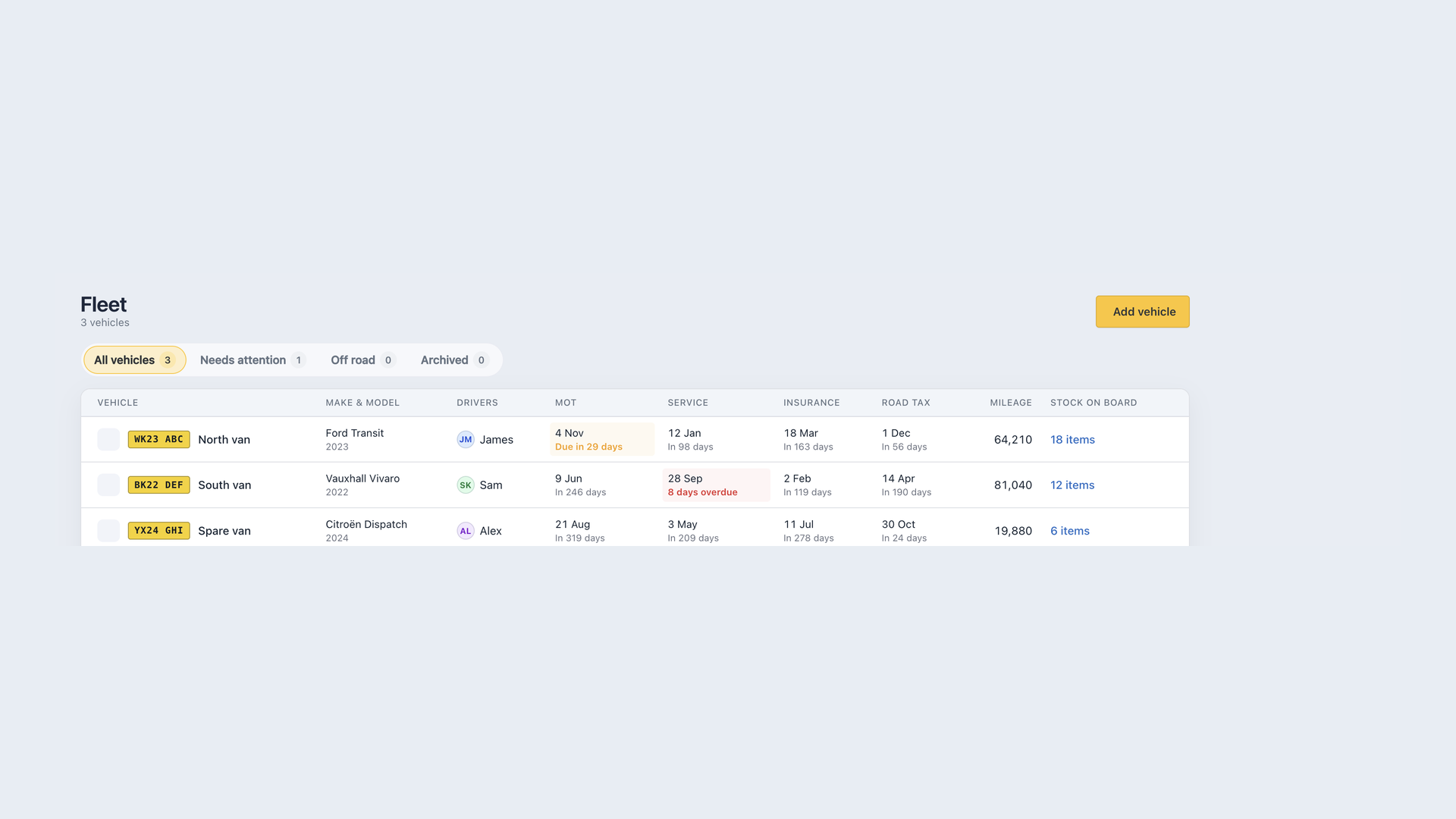
You can now keep company vehicles in one place, with the dates that keep them legal sitting next to the stock on board. Open Fleet from the main menu.
Vehicles at a glance
Add each vehicle with its registration, name, make and model, and type (car, van, or lorry). Assign drivers and log mileage as you go. The table shows registration plates, compliance status, and a link through to that vehicle’s inventory.
Open a vehicle to edit everything in one place: details, on road or off road, compliance, mileage history, notes, and archive. Mileage readings keep a history with the change between entries. Compliance updates can be marked done, booked, or as a note, with an optional cost.
Use Off road for vans that are temporarily out of service, and Archived for vehicles you no longer run. You can record a reason when you archive or restore.
MOT, insurance, tax, and service
Set the dates for MOT, insurance, road tax, and servicing. Each one is tracked on its own.
Fleet highlights anything due within 30 days or already overdue. An alert sits at the top of the page, and the Needs attention tab lists the vehicles that need action. Overdue dates show in red, dates within 30 days in amber, with relative wording such as due in 12 days or 3 days overdue.
MOT, insurance, and road tax are treated as annual renewals. Service uses the next due date you store.
Email reminders
Owners and admins get an email 30 days before each MOT, service, insurance, or road tax date, and again the day before. Each message lists the vehicles that need attention that morning, with a link straight to the needs-attention view.
The note under the fleet table is the same promise: those reminders go out, they are not only on the list.
Stock on the vehicle
Every vehicle gets an inventory location automatically. Stock on board shows in the fleet table, with a link to Inventory filtered to that vehicle, so compliance and materials live in one view.