FitterPal
  • Home
  • Features
  • How it works
  • Pricing
  • Login
  • Book a demo →
Login Book a demo →

What's new

Improvement 13 October 2026

Export invoices to Clear Books

Download a Clear Books CSV from an invoice so you can import it into your accounts without retyping line items.
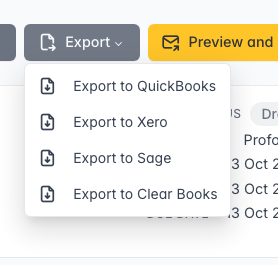
If you use Clear Books for accounts, you can export an invoice as a CSV ready for their sales invoice import.

Export menu with Clear Books option

How it works

On an invoice, open Export and choose Export to Clear Books.

The file includes the invoice number, dates, customer, line items, VAT rates, and currency. Import it in Clear Books under Tools → Import → Sales invoices, then map the columns if prompted.

Open invoices →

Get in touch

Our location

Phone us

+447904631753

Email us

team+staging@fitterpal.com

  • Home
  • Features
  • How it works
  • About
  • Pricing
  • What's new
  • Best software guide
  • Testimonials
  • Before and after photo maker
  • Growth guide
  • Privacy policy
  • Terms of service

All-in-one window-fitting job management software

Made by Kulor Ltd. Registered in England and Wales No. 15750076

FitterPal